
Iran’s mobile operators offer good services and the mobile network coverage is suitable almost all over the country. With an Iranian SIM card, you can get data packages, make phone calls, send and receive SMS, and register on Iranian applications, such as SNAPP (the Iranian Online Taxi).
There are varoius SIM Cards, from different operators, and the prices differ. Overall, an Iranian SIM Card with a starting package of 10GB internet data costs around €15, provided by HiPersia.
You can easily order your Iranian local SIM card, by contacting us at HiPersia via WhatsApp, or Email.
Iran has some of the best prepaid mobile SIM cards available, with good deals and starting packages that can reduce your expenses. Getting a local prepaid mobile SIM card is one of the necessary tools to stay connected during your trip in Iran instead of using expensive roaming services. There are two major operators that provide the best services and coverage.


Both of these operators offer good 2G, 3G and 4G/LTE, and in some areas 5G services on the GSM platform. Mostly, on all SIM cards, phone call and SMS services are available too. E-sims are just starting in Iran, and hopefully in near future they will be available to all.
The starting package of the SIM Cards, usually includes 10GB of internet data. But you can always top-up your data and phone charge with the help of HiPersia, or using the SIM card manager application which requires an Iranian Bank Card to pay with.
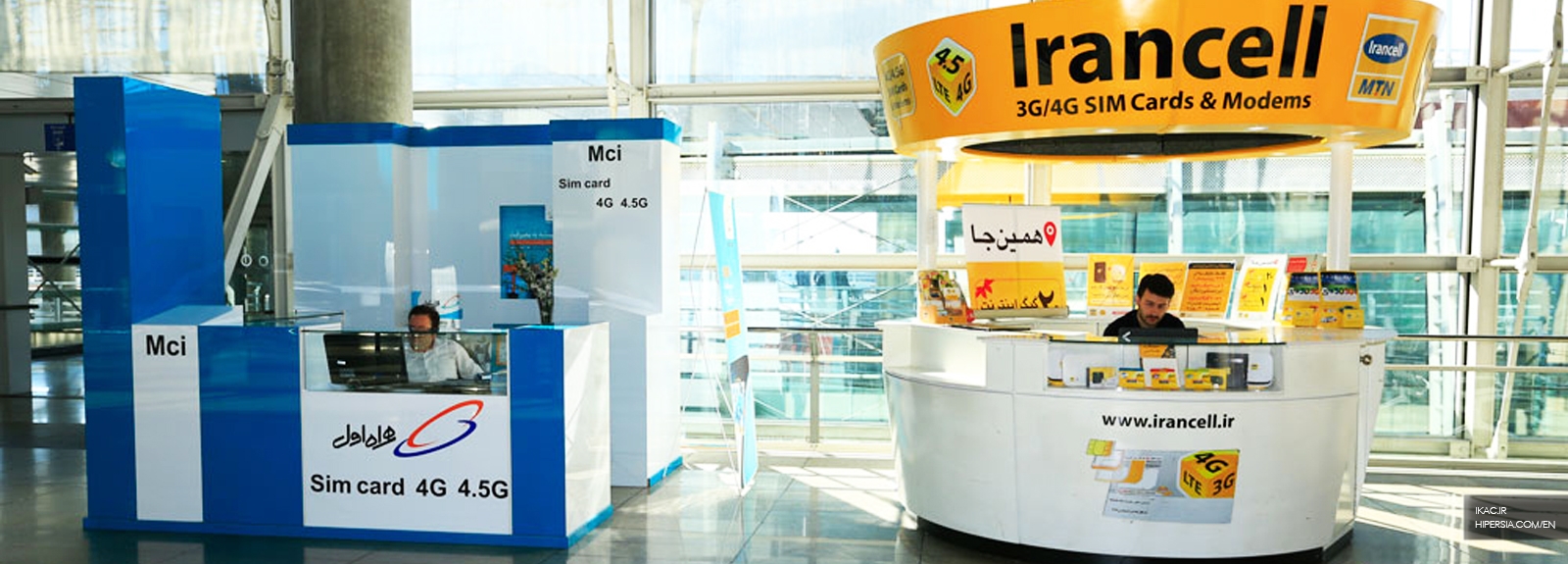
You can buy a SIM Card in different ways and locations. There are SIM Card selling stands at the international airports in Iran, but buying from them is not always conevient as the registration system may be down most of the time.
There are mobile shops in cities, where you can buy SIM Cards from them, but some specific mobile shops sell SIM Cards.
Or you can conveniently get your SIM Card via HiPersia.
You must have your passport in order to purchase a prepaid SIM card. You will also be asked to fill out a form with the information from your passport.
Note: If you want to use a local SIM card for more than a month (since the first day of using the SIM Card), you need to register your mobile phone and pay the mobile phone tax.
Your prepaid SIM card will be active as soon as the registration process has been completed. If it won’t be active, you must refer to the official stores to ask them to activate your SIM card. Please note that the activation process of the SIM card might take up to 24 hours after purchase.
For Irancell SIM card holders:
Most of the mobile phones and tablets will automatically receive the Interenet Data Activation package. If not, you can follow one of the process below to activate it.
After dialing the USSD code, you have to select your mobile operating system and follow the steps as follows:
For iOS: Go to Settings > cellular > Cellular Data Network, set mtnirancell as an APN. Then, turn on Cellular Data and enable 3G or LTE.
For Android: Go to Settings > More networks > Mobile Networks > Access Point Names > Add new APN > Name: Irancell, Internet APN: mtnirancell > Save and turn on.
For Windows: Add new APN in Settings > Access Point Name: Irancell
For Hamrah-e Aval SIM card holders:
Send the internet activation request in one of the following methods:
After activating the mobile Internet service, you must apply for receiving Internet settings in one of the following methods:
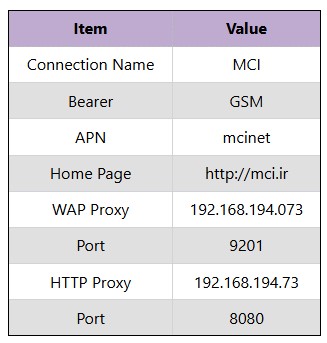
For Android: Go to Settings > More networks > Mobile Networks > insert the values of the table below
For iOS: Go to Settings > cellular > Cellular Data Network > insert the values of the table below
Note: By dialing the activation code of *#06#, the 15-digit serial number (IMEI) is displayed on your mobile screen.
The first step to be able to use the Iranian SIM cards for non-Iranian users, turn the menu language to English. For now only Irancell provide the possibility of changing the menu language. In the following, you can find out how to change it.
Irancell (MTN)
The Irancell SIM card holders can change the menu language to English by dialing this activation code: *555*4*3*2#
In order to turn it back to Persian, dial: *555*4*3*1#
Here's a guide to buying Internet packages or checking your data balance. And for your convenience, you can always contact HiPersia, to help you top up the interent data package.
Buying Internet Package
To buy Internet package, dial the USSD codes as follows:
Internet Package's Balance
In order to check your Internet package's balance, dial the USSD codes as follows:
Recharge Cards
Recharge cards can be purchased from mobile shops, ATMs, and supermarkets across Iran, mostly by Iranian bank card. For more convenience and not worrying about charging with cash or Iranian Bank card, you can always contact us at HiPersia, to top up your SIM Card.
The Recharge cards are as follows:
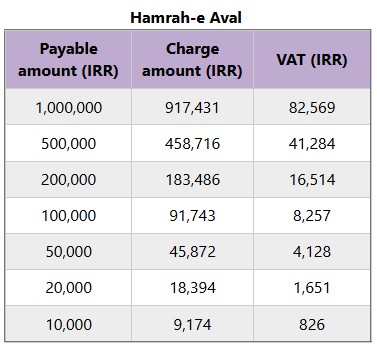
Hamrah-e Aval: To add credit, dial *140*#(voucher PIN)#
Irancell: To add credit, dial *144*(voucher PIN)#
Main Balance
In order to check your main balance, dial the USSD codes as follows:
Some mobile devices may have limitations or not work at all. If you want to be more prepared for your trip to Iran we suggest you read the articles below:






“Oh! Squander not this breath that Heaven hath lent thee, Nor make too sure another breath to borrow!’” Khayam